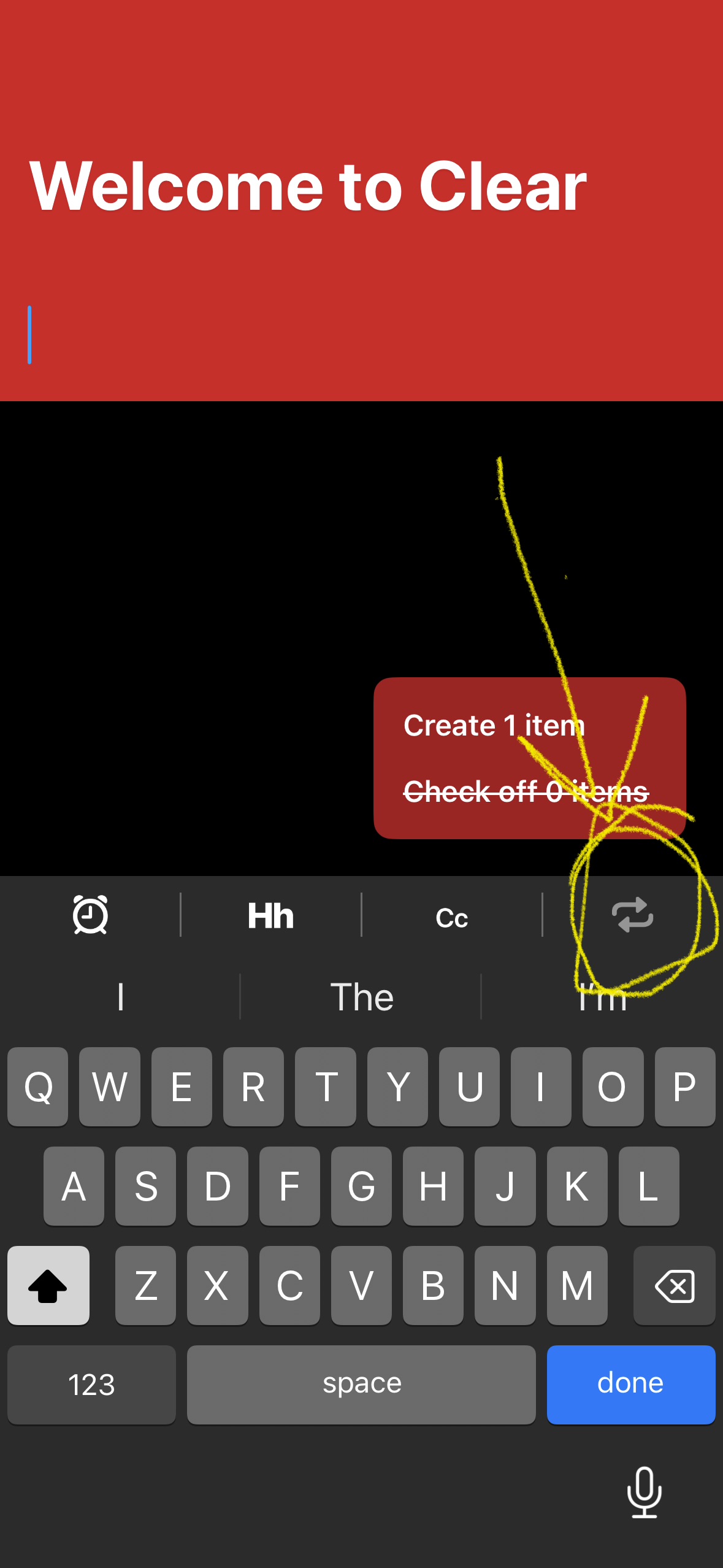
I used to be a long time user. I just came back to Clear on an iPhone 15 with the latest software. I can’t get to settings or other lists. Every time I hit the ‘invisible button’ the keyboard pops up.
Help!
I used to be a long time user. I just came back to Clear on an iPhone 15 with the latest software. I can’t get to settings or other lists. Every time I hit the ‘invisible button’ the keyboard pops up.
Help!
You’re not pressing low enough. The button is right at/above the white line that’s sometimes at the bottom. Alternatively, you can put two fingers on the screen and pinch them together to go back a level.
Thanks for trying to help. It’s literally driving me nuts cuz I used to love this app and I’m coming back after years. I’ve tried everything you said. I’ve been tapping and pinching and dragging all over with no luck. Is it possible it’s an iOS 26 setting that’s overriding the features of Clear?
Not that I know of, but I’m just a fellow user. I’m sure one of the team will chime in soon.
That… should not be? lol.
Hey, sorry for the confusion here! It appears you performed a fresh install and are behind the onboarding process. That small tab that lists a few actions like “Create 1 item” and “Check off X items” is a short list of onboarding tasks Clear wants you to complete before opening up navigation to the rest of the app. Completing those should address the issue here, but if the problem seems to be something else please let me know!